Camera reports are the part of the job nobody wants to do and everybody misses in post. On small crews — the ones who pick up the gear on Friday and shoot on Saturday — there often is no dedicated camera assistant at all, and the day’s data ends up in someone’s memory or on a folded sheet of paper. SmartLog, released on 21 August by 3D Film Parts, tries to close that gap: a free camera report app with no account and no subscription.
How it works
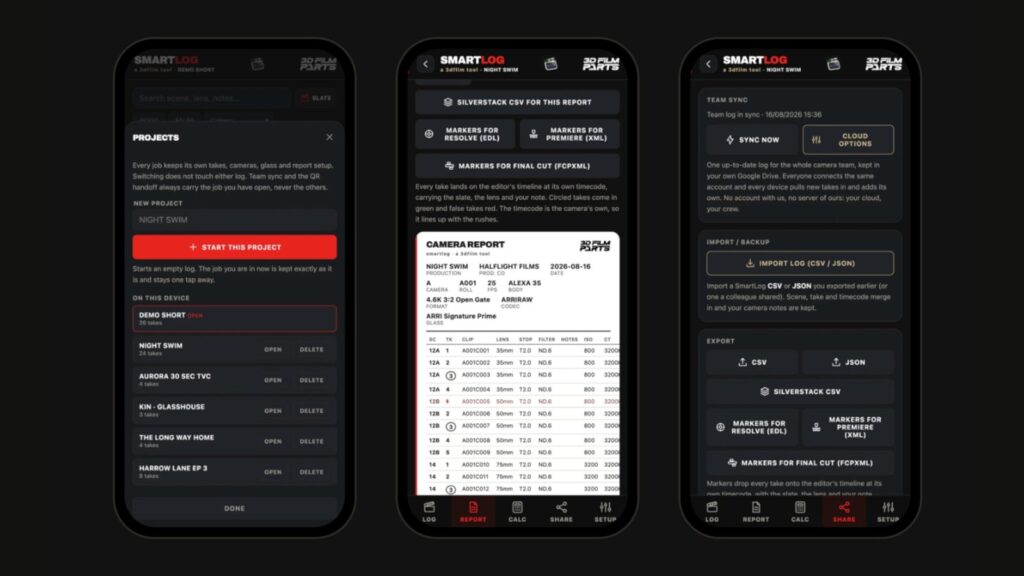
There is nothing to install: it runs in the browser and works on iPhone, Android, iPad and desktop. Each take is logged with one tap, and the app carries over the previous take’s data — lens, stop, filters, distance — so you only fix what actually changed. The internal database claims 87 camera bodies and 575 recording modes, transcribed from the manufacturers’ own documentation: pick the body and the formats are already there, no typing.
The rest is camera department material: 19 calculators (depth of field, field of view, sensor and exposure match, flicker-safe shutter, ND and stops, anamorphic desqueeze), timecode jamming by pointing the phone camera at the display, battery rotation tracking, media verification against the file list and a comparison with the shot list.
What you get at wrap
- A PDF camera report, the one you send to production and to the edit.
- CSV and JSON exports, plus a Silverstack CSV.
- Timeline markers: EDL for DaVinci Resolve, XML for Premiere Pro, FCPXML for Final Cut.
That last one is what makes it worth the download, in our view. Every take lands on the editor’s timeline at its own timecode, carrying scene, lens and note; circled takes in green, false takes in red. It is exactly the work someone usually redoes by hand on Monday morning.
Why we are flagging it to our rental clients
The value of a report is not visible on the shoot day: it shows up three weeks later, when you need to know which lens and which stop a reshoot has to match, or when the colorist asks why two shots from the same sequence do not cut together. With an ARRI ALEXA Mini shooting ARRIRAW the report is already standard practice, and whoever books it usually has an assistant. The real problem is lightweight sets: a Sony FX6 on the shoulder for a documentary, or a RED KOMODO 6K running as B camera, where nobody keeps track of cards and circled takes. There, a free log on the operator’s phone beats any written procedure.
There is also a practical reason that concerns us directly: a tidy report makes the return much faster. Knowing how many cards were filled, which batteries ran and which lenses went on saves the half days otherwise spent reconstructing everything after the fact. If you are putting a package together for a production, our rental kits already start from that logic.
Two things to know before taking it on set
First: it is still openly in beta — 51 public builds and just over three thousand launches as of 21 August — and the log lives in the browser’s storage. Export at wrap, every time, and never leave the only copy of your data on a phone that might end up in the rain.
Second: team sync goes through your own Google Drive, not through the developer’s server. We like that choice, but on an NDA production it has to be settled up front: cloud log or local-only log, not something in between. Finally, the interface is in English and Spanish; there is no Italian, and on a mixed crew that is worth knowing in advance.
Our verdict: it does not replace a DIT and does not try to. But it is the first free tool we have seen that produces a presentable report without asking for anything in return, and for independent productions shooting in Abruzzo that is a clear gain. Test it on a real shooting day before adopting it on a job that matters — that is what we are doing.
Official source: SmartLog · 3D Film Parts. Industry verification: Newsshooter.
A wide range of equipment in our catalogue, on-set delivery included across Abruzzo.