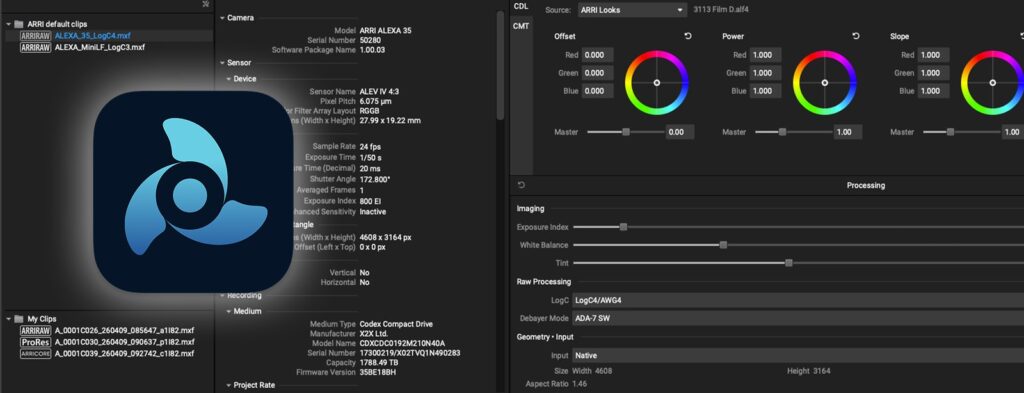
On August 12 ARRI published the first downloadable release of ART Viewer 0.9.0, a completely re-designed version of the ARRI Reference Tool with a new GUI. It is free, runs on macOS (arm64) and Windows (x64), and weighs 153 MB on Mac and 142 MB on Windows. If you rent an ARRI body and end the day with a folder of ARRIRAW to check, this is the software that opens it without spinning up your whole post chain.
What is actually in 0.9.0
ARRI’s list of changes is short, but it hits the right points:
- drag & drop clip loading;
- ARRICORE and Apple ProRes MXF support;
- MXF clip recovery for non-finalised files;
- support for embedded looks and monochrome material;
- expanded metadata viewing and export for ARRIRAW, ProRes and ARRICORE;
- an integrated bug reporting option that sends crash and diagnostic reports straight to ARRI.
That “0.9” is not a detail
Let’s be clear, because the version number tells the truth: this release only views. ARRI states plainly that the remaining features, rendering first among them, will arrive step by step. In practice: do not archive ART GUI 1.8.2 (latest macOS build April 23, 2026; the Windows one dates back to September 18, 2025) or January’s ART CMD 1.0.0, because that is still where processing to ProRes, OpenEXR and TIFF lives, along with trimming, checksum verification and look extraction.
In our view the interesting part is the coexistence: the Viewer becomes the quick tool you keep open on set or at the hotel in the evening, while CMD stays the engine you run in batch during offload.
Why it matters in Abruzzo
On a production moving between Campo Imperatore and the coast, the camera is rarely the problem. The problem is the media-check chain when the crew is small and there is no DIT. An official, free, lightweight viewer changes how you close the day, because it opens the clip as it is, shows the look applied in camera, and pulls out metadata with no transcoding.
MXF recovery for non-finalised clips deserves its own mention: it is exactly what you need when a battery gives up or power is cut at the end of a take. That is not a demo feature, it is the safety net that saves you from reshooting half a day.
Worth remembering that ART works with the ADA-7 debayer algorithm and REVEAL Color Science on ALEXA 35, ALEXA 35 Xtreme and ALEXA 265 material, and is backwards compatible with every ALEXA and AMIRA. So if you rent an ARRI ALEXA Mini from us, the tool is still relevant even though your body is not the newest one.
How we would use it in the field
The practical advice is obvious but saves evenings: download it before you leave, not on the first shooting night over the farmhouse Wi-Fi. It is roughly 150 MB, but ARRI’s page is heavy and the download deserves a calm connection.
Then keep the roles separate. On-set monitoring during the take stays with a recorder like the Atomos Ninja V; the Viewer comes afterwards, for the clip-by-clip check and the metadata export you hand to the edit. Two different moments, and mixing them up is the fastest way to slow a set down.
Since this is a 0.9, expect a few rough edges: the integrated bug reporting exists precisely for that, and at this stage using it helps everyone. Otherwise, if you work on ARRI workflows this is a download with no downside, as it neither touches nor replaces what you already have installed.
You can see all our cameras and accessories on the equipment page.
Source: official ARRI Reference Tool page – more on the processing features in the official ART CMD 1.0.0 manual.
A wide range of equipment in our catalogue, on-set delivery included across Abruzzo.