On 27 July Blackmagic Design introduced the new UltraStudio Mini 12G family: three Thunderbolt boxes that push 12G-SDI in and out of a laptop. They are the direct descendants of the old UltraStudio Mini Recorder and Mini Monitor that many of us still keep in the bag, now updated to 4K up to 2160p60 and with a few features that used to live only on rack hardware.
The three models
- UltraStudio Mini Recorder 12G (445 dollars): input only, 12G-SDI and HDMI. For capturing into the computer.
- UltraStudio Mini Monitor 12G (445 dollars): output only, dual 12G-SDI with separate fill and key plus an HDMI. This is the monitoring and graphics playout box.
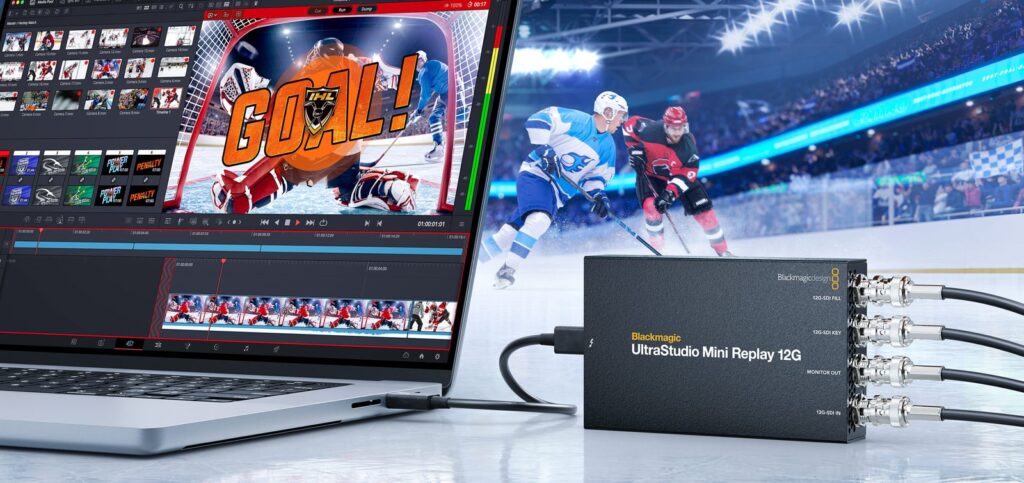
- UltraStudio Mini Replay 12G (559 dollars): capture and playback together, with dual 12G-SDI fill/key and a dedicated 12G-SDI monitoring output. This is the model that supports the replay features in DaVinci Resolve.
All three work at 10-bit, handle SD, HD and Ultra HD up to 2160p60, do RGB to YUV conversion in hardware and draw power from the Thunderbolt cable: no separate power supply to carry around. Software support covers DaVinci Resolve, Premiere Pro, Final Cut Pro, Media Composer, After Effects, Fusion and OBS.
Why it matters, and who actually needs it
The part that counts most, in our view, is the Replay model. Until yesterday, setting up a replay on a sports event or a live show meant a dedicated server and a budget no mid-size production in Abruzzo could justify. Now the hardware costs a little over five hundred dollars and the logic sits inside Resolve, which you already use. It does not turn into an EVS, to be clear: one input channel and one output channel will not cover a proper multicamera show. But for the local league match, the dance recital, the conference with an overflow room, it is more than enough.
The other welcome detail is fill and key on two separate SDI outputs even on the 445-dollar Monitor. That means anyone pushing graphics from Resolve or After Effects to a switcher can do it without buying a PCIe card and without hauling a workstation along. On a video village or a light control room, that changes the day.
On set: two things to watch
First, Thunderbolt. Bus power means the cable becomes part of the signal chain: use certified, short cables, and if the laptop is buried in a bag with other peripherals daisy-chained, expect the occasional tantrum. In the field, over the years, most of the dropped frames we have seen on these little boxes came from third-party Thunderbolt hubs, not from the Blackmagic hardware.
Second, 2160p60 is the ceiling. If you work at 4K 120 or higher for slow motion, these are not for you and you need something else. They were built for broadcast and live, not for high frame rate ingest.
Buy or rent
Here the honest answer is: at 445 dollars, if you do live work regularly, buy one. There is no point renting a device that costs about two days of camera rental. It is a different story if you need the box once, for that one event where they asked you for replay or lower-third graphics, or if it belongs to a bigger package. In that case it makes sense to build the whole set: camera, wireless, monitoring and connectivity together.
In our inventory the conversation we have most often with clients goes like this: the expensive part is never the capture device, it is the camera bodies and the wireless video. If you are putting together a live show or an event, look at the Blackmagic URSA Cine 12K for the main camera, the Teradek Bolt 6 750 to get the signal to the control room without cables, and the Atomos Ninja V as a monitor and backup recorder. If the location is awkward and there is no connection, the Starlink kit has rescued more than one stream up in the mountains. The rest is in our rental packages.
The UltraStudio Mini 12G units are available now. Full details on the official Blackmagic Design page, and the announcement was also covered by Newsshooter.
A wide range of equipment in our catalogue, on-set delivery included across Abruzzo.