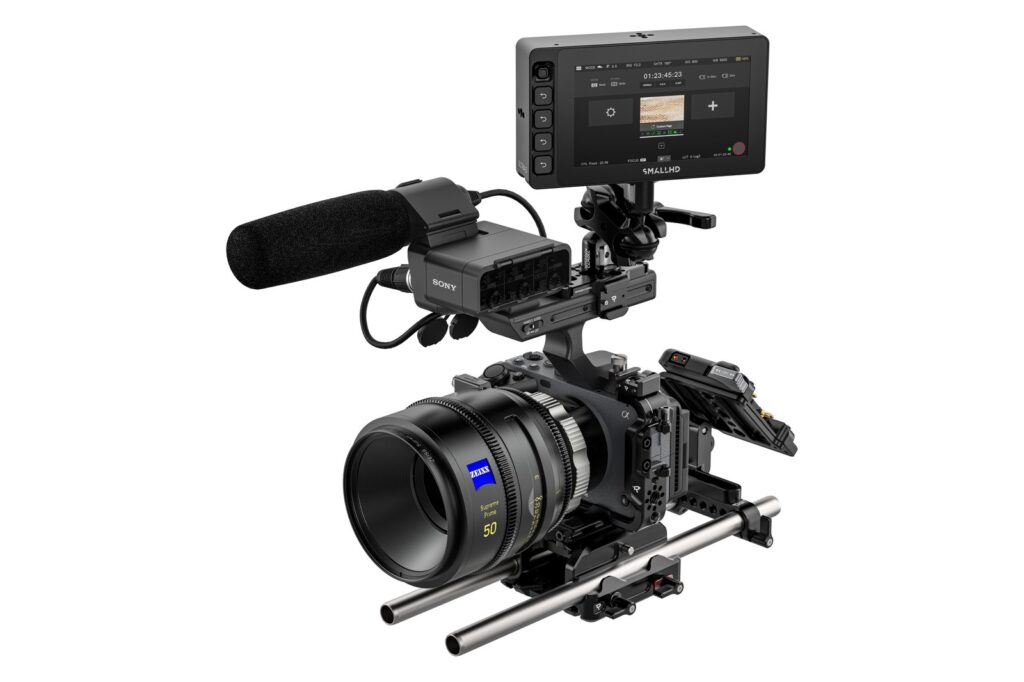
SmallHD has released the Camera Control Kit for Sony FX3: one software licence plus a cable, and its PageOS monitors drive the camera from the touch screen. It costs $279.99, ships in one to two weeks according to SmallHD, and works with the Ultra 5, Ultra 7, Ultra 10, Cine 5 and Cine 7. The details are on SmallHD’s official kit page, and Newsshooter covered it on 30 September.
What you control from the monitor
From the SmallHD touch screen you get:
- record start/stop
- frame rate, shutter and ISO
- colour temperature and white balance
- partial LUT configuration
Timecode, media status, frame rate, resolution, recording format and battery are shown read-only. The official list also mentions ND selection, but the Sony FX3 has no internal ND: that one applies to the FX6, which shares the same licence.
In the box you get the licence card (valid for FX3 and FX6) and a USB-A adapter cable with a locking 5-pin connector. The USB-A to USB-C cable for the camera is sold separately, so order it straight away or the kit won’t connect on shoot day. SmallHD recommends the FX3’s USB-C port, although the micro USB works too.
The catch: the licence stays on the monitor
Once registered, the licence cannot be moved to another monitor or removed. If you own two Cine 7s and want control on both, you pay twice. There is also a software-only “Camera Control for Sony” licence at $400, covering FX3, FX6, BURANO, VENICE and VENICE 2, again tied to a single monitor.
On Newsshooter, Matthew Allard calls it a hard sell at that price, since plenty of competitors include camera control with their monitors for free. We think he’s half right. If you already run a SmallHD and the FX3 is your everyday camera, $280 pays for itself quickly. If you swap monitors often, or only shoot the FX3 twice a year, it’s money wasted.
On set: where it actually helps
The FX3 has small buttons and a menu that gets awkward once it’s caged with a top handle. The obvious case is gimbal work: with the FX3 on a DJI RS 3 Pro, every ISO or white balance tweak means stopping and rebalancing. From the monitor on the rig you do it on the fly. Same goes for ground-level shots or car mounts where you can’t reach the camera’s own screen.
Two practical notes:
- control runs over USB, so the monitor lives on the rig. For video village you still need wireless video, such as the Teradek Bolt 6;
- an extra USB cable is an extra weak point: secure it properly to the cage, because if it pops out mid-take you lose control.
Buy or rent
The maths is simple: the licence belongs to the monitor, not the camera. If you rent, all that matters is whether the monitor showing up on set already has it activated. For a one or two day production there’s no point buying it for a monitor that then sits in a drawer. If your shoot needs an external recorder more than camera control, our Atomos Ninja V is still the most practical match for the FX3.
If you’re putting together an FX3 or FX6 setup and want to know what you really need, have a look at our ready-made kits or call us before you buy.
A wide range of equipment in our catalogue, on-set delivery included across Abruzzo.