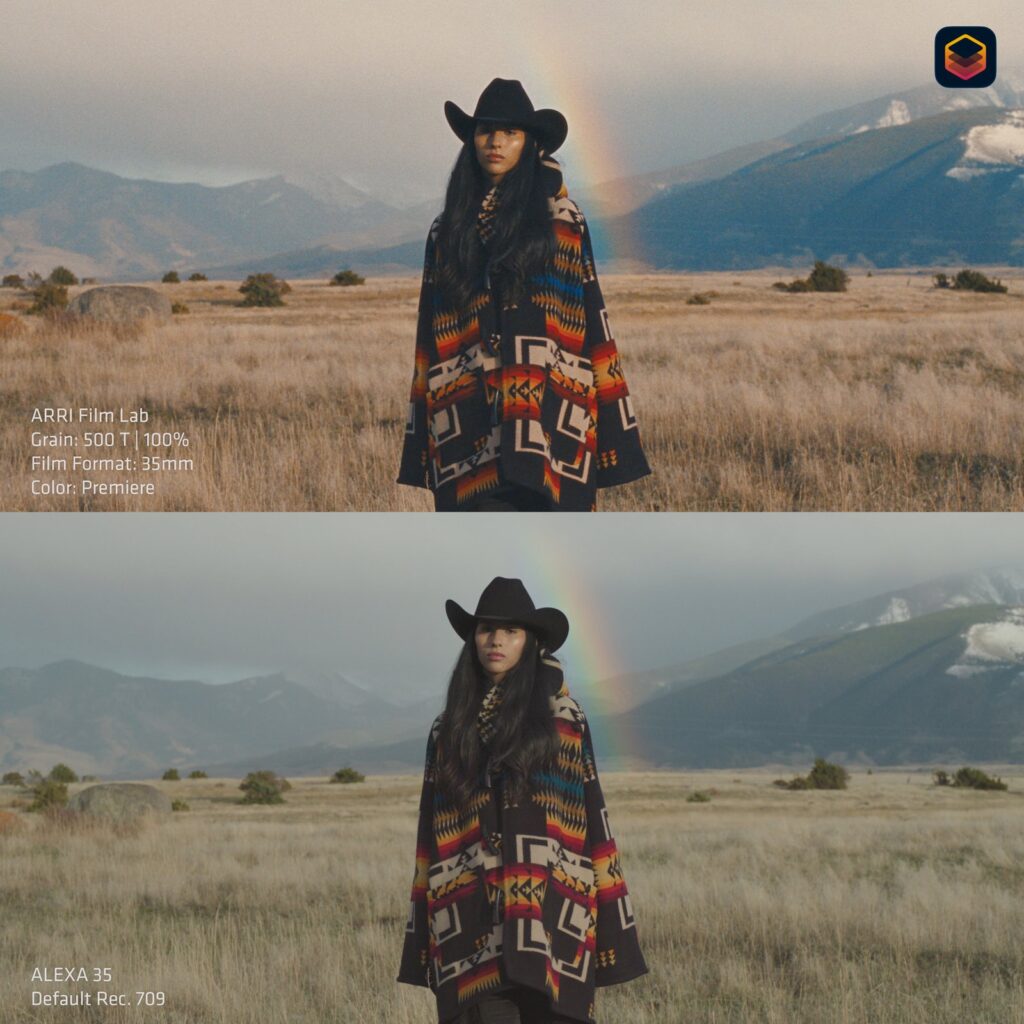
On 12 October ARRI released Film Lab 1.5, the first serious update to its OpenFX plugin that adds film grain, halation and film response to digital images. When version one came out in November 2025 we weren’t fully convinced: everything was based on 35mm and there was only one family of grain. That has now changed, and for anyone shooting digital but delivering a film look, this is real news.
What’s new
- Four starting formats: 8mm, 16mm, 35mm and 65mm. Before, there was only 35.
- Grain Size and Rendition of Detail, both from 0.75 to 1.5: the first scales the grain, the second the perceived sharpness. You can mix them, say 16mm grain with 35mm detail.
- Anamorphic Ratio: eight squeeze ratios from 1.25x to 2.0x, stretching grain and halation horizontally the way a real anamorphic would.
- Halation Spread: sets the radius and character of the glow around highlights.
- Grain Intensity and Halation Intensity now go up to 2.0, double the old maximum.
- Up to 4x faster, with real-time 4K on many more machines, Apple Silicon MacBook Pros included.
- ACES 2.0 (ACEScc and ACEScct) inputs and outputs alongside LogC3 and LogC4. In Baselight the plugin follows the timeline colour space automatically.
Negative Stocks, Print Processes and Gate Weave are still there. The update is free for existing licence holders; new customers buy it from RE:Vision Effects, which according to Newsshooter sells it for USD 494.60 as a one-off or on subscription. Full details are in ARRI’s official press release.
Why it matters to a rental house
The question we hear most from short film and music video directors is: “Can I get the texture of film without shooting film?” Until now the honest answer was “yes, but you need a good colourist and time”. With 16mm and 8mm inside the same plugin, and real-time playback on a laptop, that work gets cheaper. For a music video shot in Abruzzo on a two-day budget, a 16mm reversal look is now a post decision, not an adventure.
The most useful part, in our view, is ACEScct. A short shot with an ARRI ALEXA Mini as A-camera in LogC3 and a Sony FX6 or RED KOMODO 6K as B-cam almost always ends up in an ACES pipeline. Before, you had to slot the plugin into a precise point of the chain with manual conversions; now it goes in and out in ACEScct and the grain matches across both cameras.
Three things to watch, on set and in post
- Expose clean. If you’re adding grain and halation in post, don’t dirty the image in camera: no high ISO “to look like film”. Digital noise and Film Lab grain stack badly.
- Careful with diffusion filters. Black Mist in camera plus Halation Spread in post gives you a double glow. Decide up front who does what, filter or plugin.
- Do a real output test. Grain at 2.0 looks great on a laptop screen; in a cinema or on a big TV it can turn into a wall. Always check on the delivery format.
Buy it or not?
If you grade all year in Resolve or Baselight, just under 500 dollars for an ARRI tool built on scanned negatives pays for itself quickly. If you’re a filmmaker finishing two projects a year, the trial is enough to see whether you need the look, and the plugin belongs to whoever does the grade, not whoever shoots. What we care about is that the footage leaves the camera the right way: that’s why our cameras go out already set to the agreed log profile. The full catalogue is on our equipment page.
A wide range of equipment in our catalogue, on-set delivery included across Abruzzo.