Blackmagic has pushed its iPhone app to version 3.5, and this one isn’t the usual round of bug fixes. The release notes run to three short lines, but buried in them is something that simply didn’t exist on a phone two weeks ago: manual control over a real, mechanical iris.
What actually changes in 3.5
The update landed on 17 September, free on the App Store like every version before it. Blackmagic lists four changes:
- support for iPhone 18 Pro and iPhone 18 Pro Max;
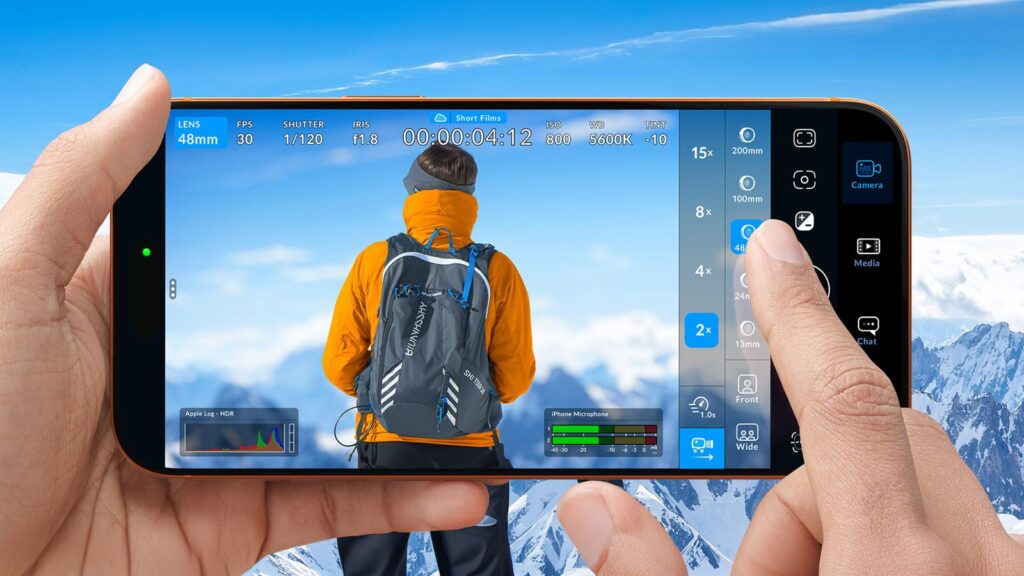
- control of the variable aperture on the 48MP Fusion main camera, to set depth of field and exposure;
- Apple ProRes recording straight to Pro Video Storage;
- Cinematic mode recording.
The two in the middle are the ones that change how a phone walks onto a set.
The iris: four stops, not a filter
The iPhone 18 Pro’s main camera carries a six-blade mechanical iris working across four real apertures: f/1.48, f/1.8, f/2.8 and f/4.0. This isn’t software-computed fake bokeh, it’s metal closing in front of the sensor. With 3.5 you set those four positions from the app instead of letting iOS decide for you.
The release notes don’t say whether you can move between apertures during a take, nor whether intermediate values exist: until proven otherwise we’ll assume the conservative reading, four steps dialled in before you roll. Anyone hoping for an iris pull like a cine lens would be disappointed anyway, because on a sensor that size stopping down to f/4.0 already walks you into diffraction. The real value here is different: holding an exposure without piling on ND, and above all being able to repeat an identical setting shot after shot.
ProRes that no longer fills the phone
For us the second point is the practical one. Recording ProRes to the Pro Video Storage introduced with the 18 Pro means internal memory stops being the bottleneck. Anyone who has shot ProRes on an iPhone knows how that ends: two hours in, the phone is full, and you’re offloading on location while the crew waits. With an external unit the workflow starts to look like a real camera’s, with media you swap out and hand to the edit. The app handles ProRes 422 HQ, 422, LT and Proxy, plus HEVC and H.264, and carries over ProRes RAW and Apple Log 2 from earlier versions.
Our take as a rental house
Let’s be straight: none of us is putting an iPhone in place of the A-cam on a commercial. But the phone as a third camera makes more sense every year, and this combination of mechanical iris and ProRes on external media closes the gap a little further. On the job we see it working in three situations: the impossible angle where nobody would wedge an eight-kilo body, the behind-the-scenes footage that later becomes social content, and the documentary where you have three seconds to start rolling.
What the phone doesn’t give you is everything else. A four-position iris doesn’t replace a set of NDs, Cinematic mode doesn’t replace a focus puller, and above all a phone sensor doesn’t replace light. If the scene is dark, it’s dark, and that takes hardware. So when a client asks whether the iPhone is enough, the honest answer is that it covers one leg of the job, not all three.
The maths is the same as always. The iPhone is already in your pocket; the support, the light and the main body are not, and those you rent for the days you need them. A DJI RS 3 Mini solves movement even with a phone on board, at a fraction of what you’d spend buying one for two shoots a year. A Sony FX3 as the main camera gives you the file the phone footage gets matched to in grade. And an Aputure LS 300X solves the problem no firmware will ever solve. The rest of the inventory is on our equipment page.
One practical note for anyone shooting in Abruzzo: if the iPhone comes along as an extra camera, budget for a serious power bank. Version 3.5 moves the storage problem onto the external drive, it doesn’t make it disappear.
The full release notes are on Blackmagic Design’s official app page. The news was also verified by CineD.
A wide range of equipment in our catalogue, on-set delivery included across Abruzzo.